


Introduction to Contacting Your Program Manager
Connecting with your Program Manager is essential for getting tailored guidance during your program participation. Whether you need assistance with program deliverables, schedule clarifications, or administrative inquiries, AcceleratorApp makes it easy to locate your Program Manager's direct email address within the platform.
Where to Find Contact Information
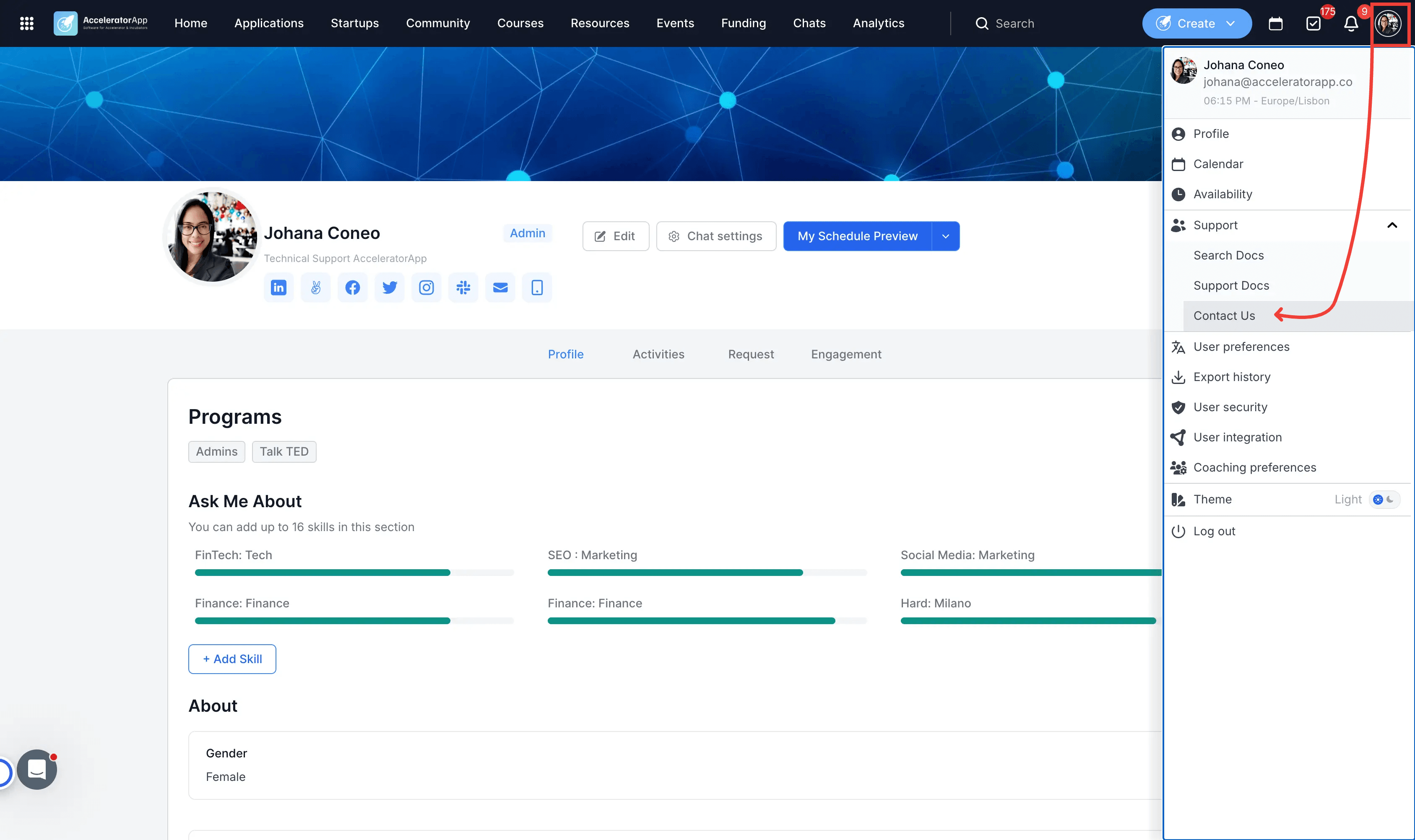
You can find the contact option inside your user profile menu in the righ upper corner menu of AcceleratorApp.
Step-by-Step
1. Open Your Profile Menu
Click on your profile avatar or icon located in the top-right corner of the top menu bar.
2. Select Support
Click on Support from the dropdown menu options.
3. Select Contact Us
Click on Contact Us to view your assigned Program Manager's email address.
Best Practices
Use clear subject lines: Include relevant context (such as your startup name or application ID) when emailing your Program Manager. [KALED: please verify]
Check general documentation first: Search the documentation site or help center for quick answers to common questions before reaching out.
Keep contact details updated: Ensure your profile information is complete so your Program Manager can identify your account easily.