


Introduction to User Integrations
The User Integrations page allows you to connect AcceleratorApp with external tools and services. From here, you can set up calendar syncs, video conferencing integrations, and connections with Zapier. These integrations save time, keep information consistent across platforms, and make collaboration smoother.
Where to Find User Integrations
Click on your Account icon in the top-right corner of the platform, then select User Integrations from the dropdown menu.
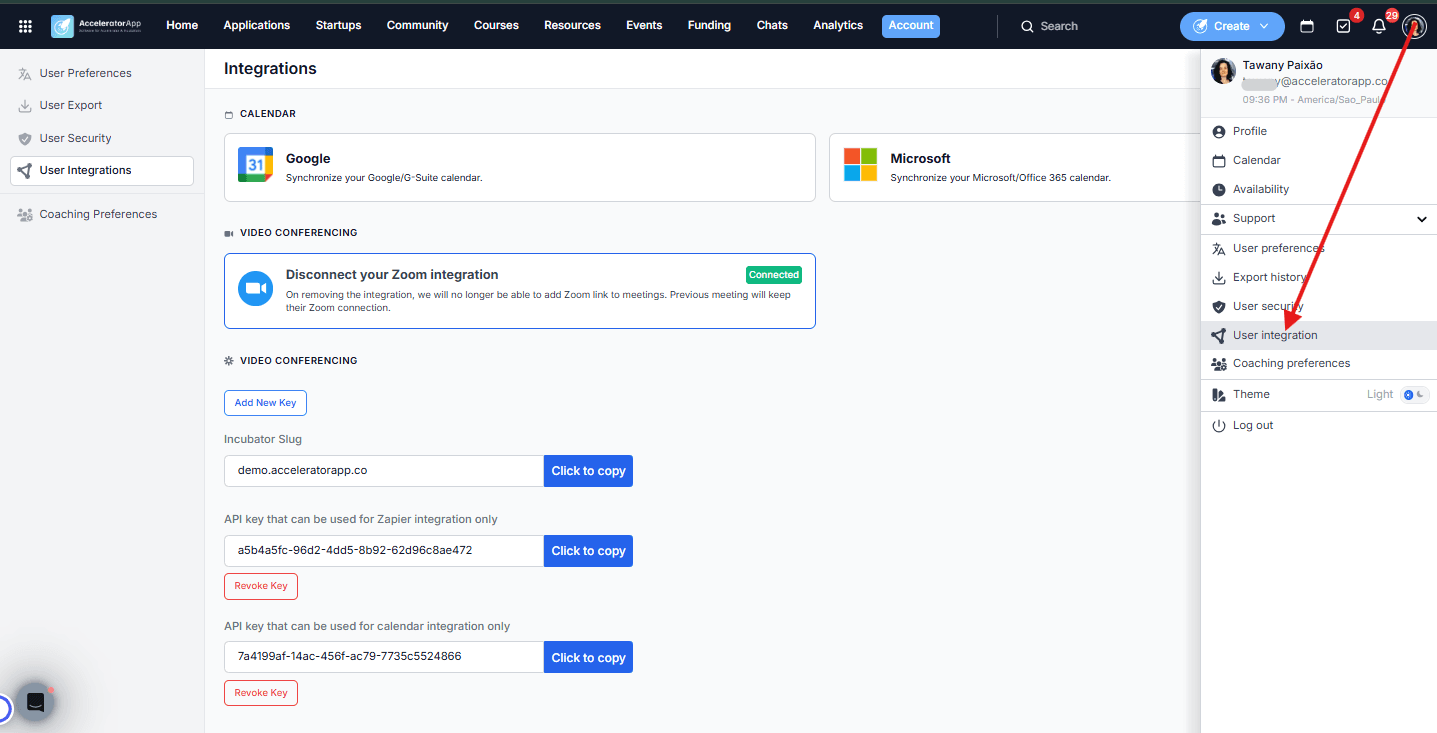
Step-by-Step
1. Connect Your Calendar
You can connect AcceleratorApp with your external calendar to keep events synchronized:
- Google Calendar — Synchronize your Google or G-Suite calendar.
- Microsoft Office 365 Calendar — Synchronize your Microsoft or Office 365 calendar.
When connected, events created in AcceleratorApp will appear in your chosen calendar automatically, ensuring your schedule stays up to date and preventing double-bookings.
2. Connect Your Video Conferencing Tool
You can connect a video conferencing integration so that meeting links are generated automatically whenever you schedule a session in AcceleratorApp. Available integrations:
- Zoom — When connected, a Zoom link is automatically added to every meeting you schedule, removing the need to create and share links manually.
- Microsoft Teams — When connected, a Teams link is automatically generated for your meetings in the same way.
If you disconnect a video conferencing integration, previously created meetings will keep their existing links. New meetings will no longer include an auto-generated link until a new integration is connected.
3. Manage API Keys and Zapier Integration
The User Integrations page also gives you access to your API keys and workspace identifier:
- Incubator Slug — A unique identifier for your AcceleratorApp workspace. Click to copy for quick access.
- API Key for Zapier integration — Use this key to connect AcceleratorApp to Zapier and automate workflows with thousands of other apps.
- API Key for calendar integration — Use this key for calendar-specific integrations via the API.
For security, you can revoke any key at any time by clicking Revoke Key, and generate a new one by clicking Add New Key.
Best Practices
- Connect your calendar before setting your availability. Once your calendar is linked, existing events will automatically block the corresponding slots in AcceleratorApp — protecting you from double-bookings without any extra effort.
- Connect your video conferencing tool before your first session. This ensures every booking automatically includes a meeting link — no manual sharing required.
- Revoke API keys if you suspect they have been compromised. You can generate a new key immediately after revoking the old one, with no disruption to your other integrations.