Feature
Analytics and Dashboards
Explore your program metrics, save an exploration as a dashboard, and filter the whole dashboard at once. Rolling out to all accounts now.
Explore your program metrics, save an exploration as a dashboard, and filter the whole dashboard at once. Rolling out to all accounts now.
Public pages per city, country or region list open programs, so founders can discover them and apply.
A clearer coaching session screen for mentors, admins and startups, plus AI-generated session summaries and relationship trackers.
A daily job watches grant deadlines and raises alerts automatically, plus a single place to message recipients directly.
A Funding Programs view across all rounds, and a Milestones page covering every recipient, both with filters that cut straight to what needs attention.
Propose an amendment directly from the field, click into compliance rows, preview attachments, and jump from a risk indicator to the records behind it.
The same multi-select action bar now appears across Applications, Startups, Users, Mentors, Forms, Course Evaluations, Emails and more.
The resubmission flow that re-opens a locked form, plus a submission history panel on the review page.
The terminology your organisation uses is now carried through funding emails, bell notifications and tasks.
Attach files to emails you compose, and export Evaluation Date and Startup Programs as columns.
The collaborator flow now works properly on a phone.
A large batch of smaller improvements and fixes, spanning courses, applications, profiles and data, performance, email and exports.
Turn on resubmission for a round and applicants can submit an updated version of their answers, with full submission history kept.
Bulk download and delete Startup File documents, bulk export and email startups, bulk add coaching hours for mentors, and act on applications in bulk.
A task and notification layer for funding work, plus a dedicated Funding Programs list and a real flow to enroll applicants from a funnel.
Choose to restore applications from a specific date onward, or none at all.
Removing a custom field that's in use now offers real choices instead of a dead-end warning.
Form sections now have an Internal Note field, replacing the description field nobody was using.
Set a custom button label and description, and see and filter external-question status in the Application Overview.
Three public mutations let Salesforce push data into AcceleratorApp.
The evaluation panel now sits on the right with the application form on the left, matching how people actually read while scoring.
Login, Forgot Password, and Activate Account now render right-to-left in Arabic, including in preview.
A large batch of smaller improvements and fixes, spanning events, calendars and meetings, applications, permissions, performance, and email.
Send documents out for a legally binding e-signature without leaving AcceleratorApp.
Reject a batch of draft applications in one action instead of one at a time.
Search for a specific field, jump straight to invalid questions, and apply conditional rules to a whole section at once.
The average score across evaluators now shows right beside the completion indicator in the Evaluations panel.
A self-service portal where grant recipients manage compliance, milestones, disbursements, and documents. Available in beta as part of the Grants Management System.
Invite collaborators, like co-founders or teammates, to view, edit, and submit the same application together.
Download your email logs as an Excel file for reporting or record-keeping.
A new permission key lets you decide, role by role, who can delete other users' saved views.
A dedicated permission key for viewing startup evaluations, separate from other access levels.
Meetings can now generate a Google Meet link automatically, joining Zoom and Microsoft Teams as supported video integrations.
Changed your mind about a rejection? Move an application straight back to Under Review.
A large batch of smaller improvements and bug fixes from August, spanning applications, tags and filters, email, forms, permissions, and the website.
 The AcceleratorApp Team
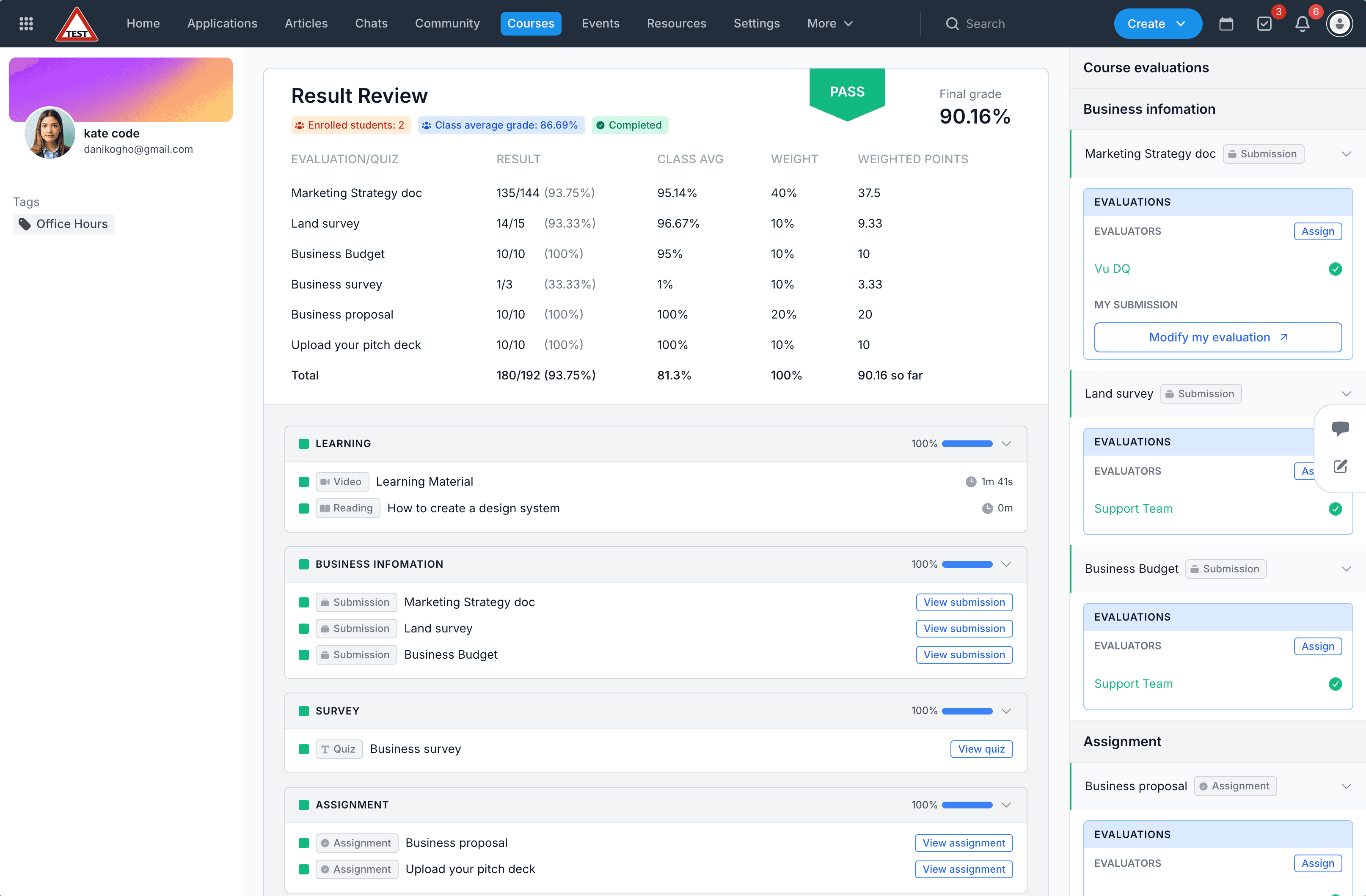
Assign weightage to gradable units in a course, and track results in a new student gradebook view.
The AcceleratorApp TeamRegistration emails and calendar invites include the physical location and the video conferencing link together, when an event offers both.
The AcceleratorApp TeamSwitch between a compact single-line view for scanning and a wrapped multi-line view for reading full content.
The AcceleratorApp TeamThe evaluation form selector in Funnel Builder now has a Create a new form shortcut, matching the existing application form flow.
The AcceleratorApp TeamSmaller improvements and bug fixes from July, including calendar sync, video recording uploads, and a form-publishing crash.
The AcceleratorApp TeamTarget an event to a specific group, and only that group sees it.
Founders, mentors, coaches, and staff can now message each other directly, without leaving AcceleratorApp.
See host availability and conferencing details, then create a meeting without leaving AcceleratorApp.
Book a meeting and get a Teams link automatically, no more copying and pasting links by hand.
Check attendees into your events by scanning a QR code, no manual look-ups.
Track funding rounds, recipients, and disbursements from a single, centralized module, now in beta.
Students can now ask an AI chat to find and summarize resources, and admins get proper folders to organize and gate access.
See at a glance on the Application File page when a meeting step's end date has passed.
See which interviewers are assigned and which are actually meeting each candidate, right from the Application Overview.
Set the meeting length that fits your process instead of a fixed default.
In Day and Week views, events scheduled close together stay visible instead of hiding one behind the other.
Smaller improvements and bug fixes from the past few weeks, including calendar sync, chat, and translation fixes.
Assign multiple mentors to a program in a single bulk action, instead of opening each mentor record one at a time.
Assigning or removing tags across many applications at once is dramatically faster, even on large funnels.
Filtering applications by funnel is noticeably quicker, especially on programs with thousands of applicants.
The Own Evaluation and Combined Evaluation columns in Application Overview now have a clear visual separation, so it's obvious at a glance which score is yours and which is the cohort's.
A new collapsible component, debuting in the Application Overview, lets you expand long field values on demand instead of having them dominate the layout.
The left navigation now adapts properly on small laptops and portrait tablets, and the Application Analytics views work cleanly on phones.
If you invite a user who already exists in AcceleratorApp, you get a clear alert instead of a silent failure.
A roundup of the smaller refinements and bug fixes shipped this month, chat polish, layout fixes, and a handful of dropdowns that now behave.