


Introduction to the Event Export Functionality
Exporting event data allows administrators to maintain offline records, perform attendance audits, and track engagement levels. Exports are performed on a per-event basis, ensuring you get the most relevant data for specific sessions.
Where to Find Event Export Functionality
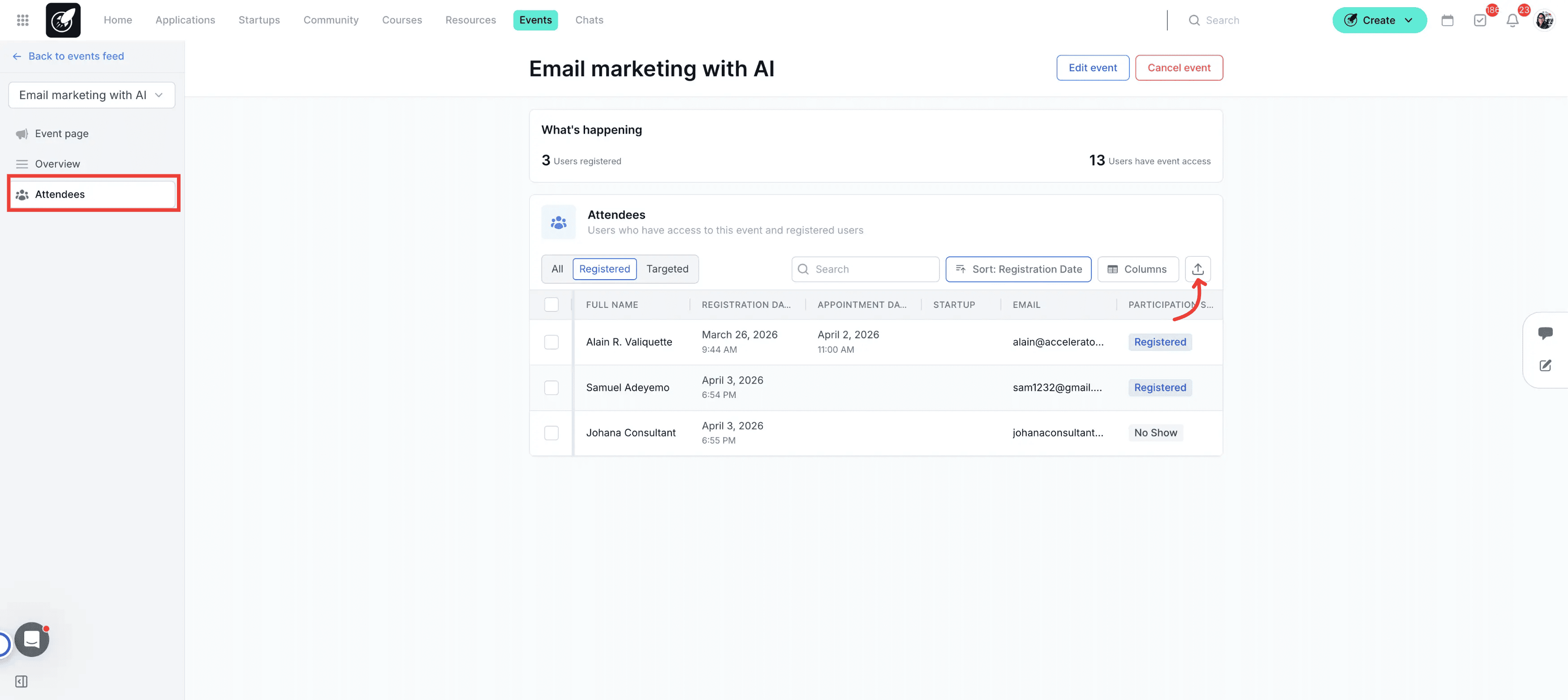
The export functionality is found within the Attendee Tab of any Event.
Navigation: Go to Incubator Events > Select your Event (Group or 1-on-1) > Click the Attendees tab.
Action: Click the Export icon located in the top-right corner of the attendee list.
Step-by-Step Actions
1.Exporting Group Events
When you export a Group Event, the system focuses on registration volume and collective data. You will get one doucment with two tabs:
Event Summary Tab: Contains the high-level logistics (Event Name, Host, Date, Duration, and total # of Registrations).
Attendee List Tab: Lists each participant's name, email, startup name, and their current registration status.
2.Exporting One-on-One Events
One-on-One exports are more granular, focusing on individual appointment scheduling and potential vs. actual meetings. You will get one doucment with two tabs:
One-on-One Summary Tab: Includes advanced metrics like "Selected Period," "Period Length," "Meeting Duration," and the ratio of # of Potential Meetings to # of Meetings Scheduled.
Detailed Attendee List Tab: Beyond registration status, this sheet includes Appointment Start/End times and specific meeting durations for each startup-mentor pair.
Tips & Best Practices
Analyze Scheduling Efficiency: For One-on-One events, use the # of Potential Meetings column in your export to identify under-utilized mentor time.
Verify "Registered" vs. "Attended": Before exporting, ensure your team has updated the status for participants to reflect actual attendance for more accurate reporting.